ScreenBeam™ 750 Wireless Display Receiver for Small-to-Medium Scale Deployments
#SBWD750W ScreenBeam 750 Wireless Display Receiver with ScreenBeam Central Management System (CMS), Wireless Version- Industry-standard Miracast wireless display receiver
- Designed specifically for commercial applications: dense wireless environments, high reliability, remotely manageable, no wi-fi required
- Supports up to 1080p30 HD resolution and 5.1 audio
- Configurable secured and hidden PIN enforcement for presenter connection only
- Includes Central Management System (CMS) for IT remote management

Wireless Display Receiver for Small-to-Medium Scale Deployments
The ScreenBeam 750 is a wireless display receiver for educators and small-to-medium business professionals who need wireless display connectivity to collaborate, create and communicate. Built for small-to-medium scale deployments, it comes complete with the ScreenBeam Central Management System (CMS) for IT remote management. The ScreenBeam 750 modernizes class, conference, and meeting rooms with the latest Miracast wireless display technology, and supports robust security and manageability that IT departments need.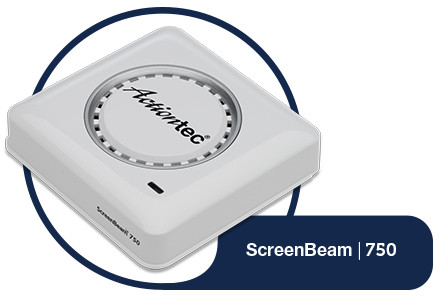

Business professionals boost productivity and collaboration in meetings and conference rooms with the ScreenBeam 750. Modern devices connect to the display with ease and users may present from anywhere in the room.

Teachers are now free to move around the classroom, creating an interactive and collaborative learning environment. The ScreenBeam 750 is ideal for small-to-medium deployments in school districts that seek higher student engagement, collaboration and interactivity.
Easy to Install
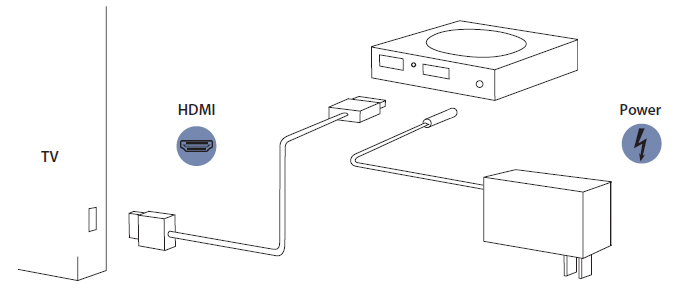
- Place the receiver next to the TV display.
- Using an HDMI cable, connect one end to the receiver's HDMI port and the other end to the HDMI port on the TV. Note: If VGA connection is preferred, refer to ScreenBeam 750 receiver's user guide for additional details.
- Connect one end of the receiver's power supply to the receiver's power port, and the other end to an electrical wall outlet.
- Turn on the TV and switch to the HDMI input to which the receiver is connected to.
- Wait about 30 seconds, then verify the TV displays the Ready to Connect screen.
Product FamilyNot sure which receiver is best for you?
| Product | Actiontec® ScreenBeam™ | |
|---|---|---|
| Target Market | ||
| Miracast P2P Wireless Display | ||
| OS Support | ||
| Extend / 2nd Screen Mode | ||
| 1080P HD video (HDMI) with 5.1 Audio | ||
| UIBC Support for Windows 10 with Continuum | ||
| Touch Screen Support | ||
| Configurable Wireless Channel | ||
| Adjustable Wireless Transmitter Power | ||
| VGA Projector Support | ||
| VGA Pass-Through for Non-Native Miracast Devices | ||
| PIN Pairing Types | ||
| Force PIN Pairing on Every Connection | ||
| Secure Hidden PIN Option | ||
| Secured Local Management | ||