
Expand your desktop view with the DiamondDS3900V2 – Docking Station. USB peripheral devices can also be connected to your computer using a single USB3.0 cable connected to the DS3900V2, creating not only a multi-monitor setup, but an extended workstation as well.
With DisplayLink’s Plug and Display technology, the DS3900V2 allows you to add additional monitors and peripherals to your laptop, Windows Tablet or desktop. And since the technology is used in products from universal PC and peripheral brands, getting connected is as easy as simply plugging in a USB cable. You can enjoy Dual-Video by connecting extra monitors all in1080P resolution. With one simple cable connection to your computer, you can have access to another PC monitor, HDMI large-screen displays, stereo speakers, external hard drives, optical disk drives, printers, USB keyboard, mouse, and other USB devices. There’s even an Ethernet port for your network connection.
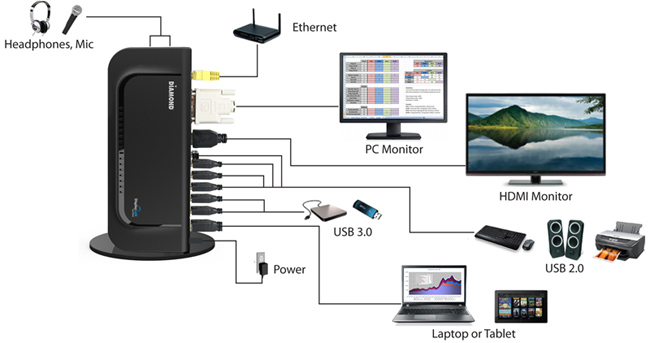
Universal Display Capabilities
The DS3900V2 is equipped with USB to HDMI, DVI and VGA (with the included adapter) connection capabilities, so that any computer or device can easily connect to any monitor without the need for special cables.The DS3900V2 uses a built-in USB interface that is universal in all PC systems, so plugging in your DS3900V2 is as easy as plug and play. Whether you’re an office manager, designer, stock trader or teacher, the Diamond DS3900V2 – Docking Station is the perfect solution for adding and expanding your desktop.